|
|

|

SaVoir V4.2.6 (16/05/2010)
| New features | |
|---|---|
| 1 |
Eclipse constraint type to allow disabling acquisitions during Eclipse periods, with configurable time margin, i.e. the constrain is applied in the time window [tEnterEclipse - tMargin, tExitEclipse + Margin]. The Margin can be positive or negative. The constraint is activated at sensor level in the properties grid and via the Sensor Wizard. |
| 2 |
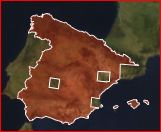
Now SaVoir handles regions with holes. The function is limited to reading and writing from / to shape files (.shp, .kml, .gml, .tab), displaying the regions and testing "PointInRegion". Region boolean functions (Intersection, Union, Subtraction), Swath intersection still ignore holes. Correct display of region with holes is limited to the 3D projection. |
| 3 | Autosave. SaVoir saves the current workspace to a temporary location every 5 minutes (configurable through Edit / Properties...). At application exit the file is deleted. Should SaVoir exit incorrectly (crash) the last Autosave is kept. When restarting SaVoir, the user will be prompted to reload the last Autosave workspace. |
| 4 | Exclusive Mode handling. Some satellites configured in SaVoir present mode incompatibilities. For example, the SAR instrument in Radarsat-1 and -2 consists of one instrument (SAR) with several Modes (Standard, ScanSAR, Fine, etc), and each mode with many Beams. SAR modes cannot operate simultaneously. This is a three-tier configuration (sensor-mode-beam). However, SaVoir can only handle two-tier configurations (sensor-mode) . Therefore, be configure Radarsat as several sensors (SAR-Standard, SAR-Fine, etc) each with many Modes (Beams). Because SaVoir did not check for cross-incompatible sensors it may happen that incompatible sensors are selected during intersection finding. Now it is possible to group incompatible sensors with a Grouping tag (see Sensor Properties pane, and "ExclusiveGroup" tag in the XML files). Sensors having equal Grouping tag(under the same satellite) are considered cross-incompatible. Swath intersection results will be calculated for these sensors like it was done before, and at the end incompatible swaths will be screened. Swaths are incompatible if they overlap in time and belong to different sensors with equal Grouping tag (under the same satellite). Screening of incompatible swaths will be done according to priority. The highest priority swath ( = lowest priority number) will be selected, and the others will be dropped. In case of equal priorities, the swath yielding best coverage (% Area) will be selected. The following satellites have been configured with Grouping tags: Radarsat 1 and 2, TerraSAR-X, Cosmo-Skymed 1,2 and 3, Envisat. |
| 5 | Under the Window menu, there is now the possibility to Reset the Windows layout. |
| 6 | Satellite models are not anymore distributed with the application, but downloaded on request from a central site. With the increase of available satellite models the application distributable size will not vary. A versioning number is now included to allow future upgrades of the model configuration. |
| 7 | Satellite models are provided with increased realistic reflectivity. |
| 8 | Dynamic scaling of arrows and coordinate systems when changing the 3D Model scale. |
| 9 | Some of the general Properties pages have been reorganized in thematic pages (Layout, Gantt, Time Options, Autosave, Map options) removing some clutter and providing more clarity. |
| 10 | The file type .svw (SaVoir Workspace) is now registered in the target machine to be opened with SaVoir. |
| Fixed source | |
| 1 | Improved handling of steerable sensors that provides an performance boost when calculating swath intersections. |
| 2 | Improved overall robustness of SaVoir by a completely revised management of graphic resources in the graphical card and threads management. |
| 3 | Fixed display of cycle numbers in the Gantt View. |
| 4 | Fixed representation of frame numbers over framed swaths. Before SaVoir displayed more frame numbers than necessary, before swath start and after swath stop. |
| 5 | Fixed "Define Time and Orbit Boundaries" dialog (under Edit / Time / Advanced...) to correct some cases of inconsistent cross updates. |
| 6 | Fixed Video Recording pane. The WMV Windows Media Video format caused application crash. Selection of some codecs left the Video status in unusable state, requiring to restart the application. Windows Media Video format caused application crash. Selection of some codecs left the Video status in unusable state, requiring to restart the application. |
| 7 | Fixed the Satellite Wizard, to allow editing Sun Synchronous orbits. The RC Repeat Cycle and CL Cycle Length can now be changed. When changing the RC SaVoir calculates a candidate CL, and vice versa, that are mutually consistent as regards the SSO Sun Synchronous Orbit constraint. |
| 8 | Fixed scale distance measurement in 2D projections. |
| 9 | Fixed handling of Styles pool. In previous versions, when saving a workspace, SaVoir saved a very large number of styles (over 1000). When loading a workspace the swath colors, fonts, etc were not correctly initialized the saved values. Now the number of styles is much reduced (typically below 100) and they are all different, and the styles should be correctly loaded. |
| Configuration updates | |
| 1 | New satellite models available: CBERS, WorldView-1, WorldView-2, Cosmo-Skymed and Swarm. |
| 2 | Radarsat-2 configuration has a default Nominal orbit configuration, to coincide with the nominal orbit of Radarsat-2 Acquisition Planning Tool. |
Multisatellite Swath Planner - © Taitus Software Italia srl All rights reserved- info: support@taitus.it