|
|

|

RF Interference Analysis
RF interference is a relatively new problem. Usually EO satellites operate in the X-Band, approximately between 8.0 and 8.5 GHz. This offered almost 500 MHz bandwidth which was in the past sufficient to avoid problems of cross-satellite interference through a well designed RF Frequency assignment. Recently, with the advent of new missions like GMES or NOAA, the satellites will downlink at 500 Mbps occupying the full X-Band. This puts a problem of RF interference at a Ground Station when two satellites, by chance ,appear to fly within the beam-width of the Ground Station antenna. This should happen relatively seldom, but with the increase of missions it can occur rather frequently. It is important to schedule cases of RF Interference to prevent downlink at those and avoid data loss.
To carry RF Interference analysis proceed as follows (see video demo on YouTube):
- Select the Antennas and Satellites of analysis.
- Select the Period of Analysis, and press Refresh.
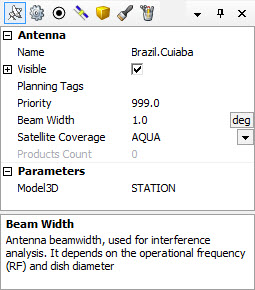
- For each Antenna define its beam-width (default = 1 degree) via the Antenna properties grid.
- From the Visibilities top menu select launch Interference Analysis.
- If RF Interference events are found they will be shown on a Gantt view. This can be output to Excel, XML, etc.
Multisatellite Swath Planner - © Taitus Software Italia srl All rights reserved- info: support@taitus.it