|
|

|

Latency
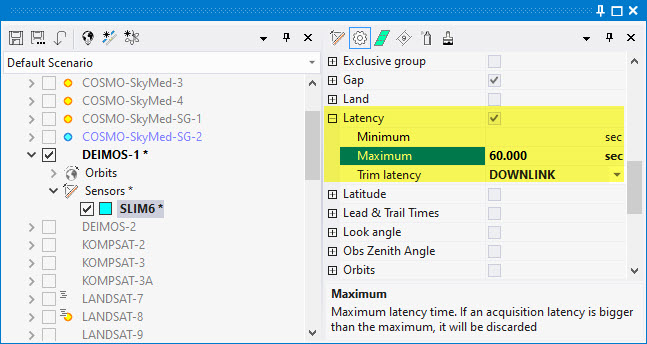
Define minimum and maximum latency constraints for each swath.
- Maximum: If an acquisition latency is bigger than the defined maximum, it will be discarded.
- Minimum: If an acquisition latency is shorter, it will be discarded.
- Trim latency: Defines how latency will be measured, out of three possible settings
- TASKING: Latency is measured from Tasking to Sensing. It requires one or more antennas configured as Uplink antennas
- DOWNLINK: Latency is measured from Sensing to Downlink. It requires one or more antennas configured as Downlink antennas
- DELIVERY: Latency is measured from Sensing to Delivery to user. The Delivery is an additional delay on top of the Downlink delay. It is the result of adding the constant Delivery Times configured in the satellite, the sensor and the antenna that participate in the generation and downlink of the data take. By default all delivery times are configured as 0 seconds, in which case the DELIVERY option will yield the same result of the DOWNLINK option
- ALL: Latency is measured from Tasking to Delivery. It requires antennas configured either as Uplink and Downlink, or both.
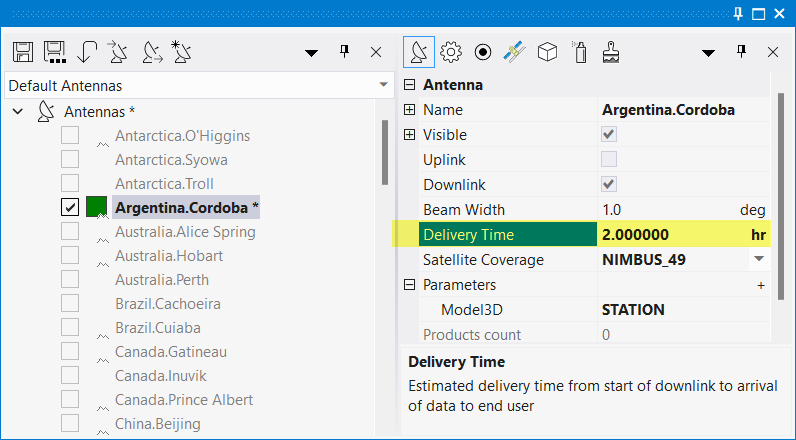
The Latency value is evaluated only in the presence of selected Antennas. Without selected antennas the constraint is ignored.
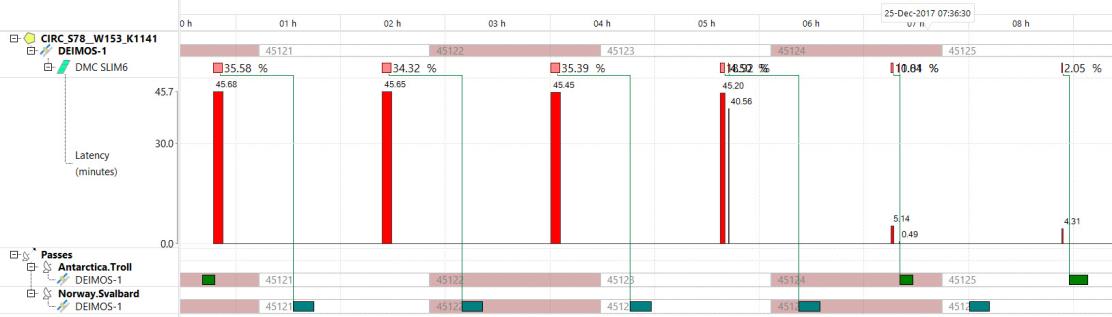
You may plot the latency values for an acquisition plan on the Gantt by right click on the types bar and select "Latency". You may need to generate a visibilities time line (menu Visibilities / Antenna to satellite) prior to plotting the latency values.
Multisatellite Swath Planner - © Taitus Software Italia srl All rights reserved- info: support@taitus.it