|
|

|

Areas of Interest
From this page, the default style for the areas of interest can be set. The parameters are self-explanatory and help text is provided when the tag is selected.
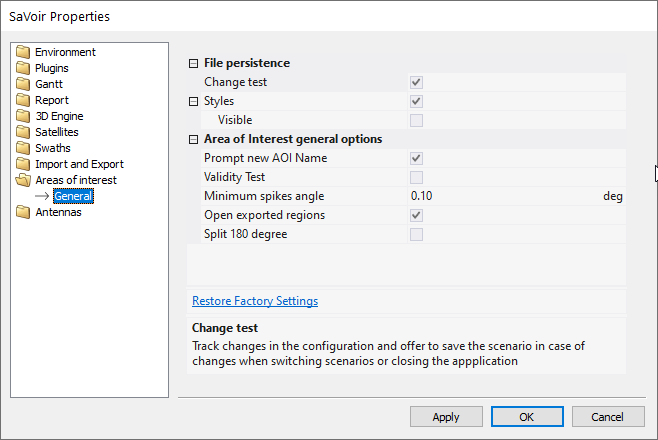
File Persistence
- Change test : track changes in the configuration and offer to save the scenario in case of changes when switching scenarios or closing the application.
- Styles: When enabled the style information will be saved and retrieved across application sessions.
Area of interest general options
- Prompt new AOI Name: Whenever a new Area of Interest is created the user will be prompted to edit its name
- Validity Test:Analyse the AOI validity when generating the AOIs table. It may have a performance impact when displaying many AOIs
- Minimum spikes angle:define a minimum angle between region points to identify spikes. Used in Remove Spikes function.
- Open exported regions: When exporting AOIs or other region to KML, Shape file, etc, offer to open the resulting file in the associated with the output file type.
- Split 180 degree: Split the resulting regions to avoid crossing the 180 degree line. Select this when exporting to KLM , KMZ or shape file to permit visualization in Google Earth.
Multisatellite Swath Planner - © Taitus Software Italia srl All rights reserved- info: support@taitus.it