|
|

|

Scenario properties and styles persistence
The following functions have been added to help in managing scenario files across SaVoir sessions.
- Change Test
- Style persistence
- Visible state persistence
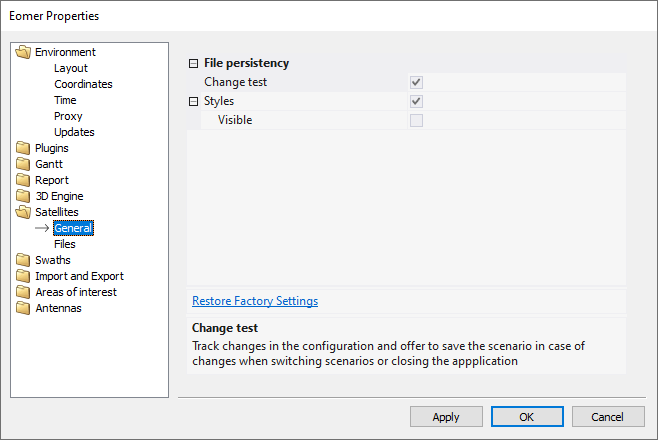
They can be managed via the Edit / Properties /<scenario>/ General pages, applicable to each scenario file: satellites, areas of interest or antennas.
Change test
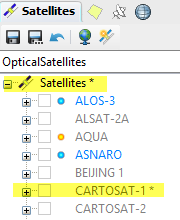
When enabled SaVoir will track changes in the scenario configuration, and show them with an asterisk sign at right of the item name in the scenario tree. On application exit, or when switching scenarios, SaVoir will prompt to save the changes. Configuration changes are modifications affecting the scenario configuration file, e.g. orbit data, sensor field of view, etc. Changes to item styles or visual properties are not considered.
When disabled SaVoir will ignore configuration changes and will not prompt to save the scenario file.
Default state: enabled.
Style persistence
SaVoir assigns default visual styles and properties to all scenario items, e.g. colors of swaths, orbits, areas of interest, etc, are assigned randomly. The user may change these settings in a SaVoir session.
On application exit, or when switching scenario, SaVoir will save the session styles and visual properties applicable to the current scenario in a separate styles file (extension ".svs" for SaVoir styles) , collocated with the scenario configuration file.
When loading a new scenario file SaVoir will attempt to load the collocated styles file, if existing, to apply the styles of a previous session.
This technique allows to preserve style information across SaVoir boundaries without affecting the integrity of the scenario configuration file.
This behaviour can be disabled with the styles flag in Edit / Properties / <scenario>/ General
Default state: enabled.
Visible state persistence
As an extension of the styles persistence, it is possible also to preserve the visible state of each scenario item across SaVoir sessions.
Default state: disabled.
Multisatellite Swath Planner - © Taitus Software Italia srl All rights reserved- info: support@taitus.it